Wi-Fi marketing for restaurants and bars

How to leverage free Wi-Fi to drive sales and customer loyalty

wifi marketing for restaurantsWi-Fi marketing is one of the most cost-effective and innovative ways for restaurants to increase customer loyalty and brand recall while using hardly any additional technical resources. If you own a restaurant or bar, you may consider the benefits of Wi-Fi marketing, but you may also have some questions about how it works, and what it can do for you.

How does Wi-Fi marketing work?

Wi-Fi marketing works by exchanging your establishment’s Wi-Fi services to your customers for their contact information. You can do this in a variety of ways, such as prompting customers for their mobile phone number, email address, or a social media profile. After you have collected this information, you will have a solid list of qualified customers who you can market, and remarket to, through SMS coupons, email promotions, and social media campaigns.

How much does Wi-Fi marketing cost?

If you already have Wi-Fi set up at your restaurant or bar, you’ll simply need to add a second portal to securely isolate your guest network from your private network. This is usually a small charge, and many establishments, if done correctly, have found that Wi-Fi marketing can make more money! Some success stories can demonstrate how increasing your marketing list can bring back customer more often, ensuring they spend more time and more money at your restaurant or bar.

This sounds technical; how will I manage it?

While it’s not very difficult to set up and manage, if you’re not tech-savvy, it will be best to work with a technology solutions provider to manage this for you. You’ll need to identify how and where your users log in, whether it’s through your website or social media, and you’ll need to make sure you’re tracking them correctly. There are options that allow you to customize, design, and brand your entrance pages. If you want it to look professional, we recommend hiring a qualified professional to execute it.

Is Wi-Fi marketing safe?

Wi-Fi marketing is as safe as any other public network that a user may use. When you opt into a public Wi-Fi connection, you are acknowledging the risk and agreeing to a terms of use policy.

“The user doesn’t have much control over the security component of Wi-Fi, says Anup Balagopal, CEO and Founder of Wi-Fi Waiter, an innovative company that allows users to skip the line and order directly on their mobile phones.

“However, they should only browse secured sites through public Wi-Fi, which are https enabled.  It is the responsibility of the merchant and Wi-Fi service provider to ensure security of the network by configuring firewall rules and not allowing peer to peer connection on the network,” advises Mr. Balagopal.

While it is common sense, you should advise your patrons not to share any passwords with anyone around them, or visit websites that contain sensitive information, such as a credit card.

What are some examples of businesses who have done this and what were the results?

Wi-Fi Waiter is a technology solutions provider that converts Wi-Fi in your restaurant into an ordering solution so that customers can place orders by connecting to Wi-Fi. In the last six months, it has found the following benefits for its clients:

  • The average ticket size increased by 15.8% compared to the average ticket size from orders collected at the counter.

  • 54% of the orders collected included an add-on, up-sale, or additional modifier.

  • 19% of the customers have used the service more than once over the past 6 months, leading to 42% of the total orders collected. This proves the high uptake of the service by loyal customers and high repeat usage.

  • 30% of the users who placed orders using Wi-Fi Waiter also accessed free Internet at the location.

    -source: Wi-Fi Waiter

Wi-Fi marketing isn’t just a winner with restaurants, it’s been demonstrated time and again to deliver stellar results across many different business types. With its data and leads collected, Charlotte Russe launched a campaign promoting happy hour called “Appy Hour,” and saw sales increase by 42% in a single day. Flip Flop Shops, a store located inside a shopping mall, offered free Wi-Fi to guests and offered them exclusive coupons when they logged in. With this campaign, the store saw nearly four new customers join their Wi-Fi each day, gained almost 1,000 new e-newsletter subscribers, and saw a 17% redemption rate on their coupons in an 8-month period.

Will people come just for the Wi-Fi and not buy anything?

While this may have been true to the first coffee shops that pioneered free Wi-Fi, and got stuck with students who stayed all day and didn’t buy anything, free Wi-Fi is no longer seen as a luxury, but something that will add value to your customers’ experience while visiting your establishment.

As an incentive for signing up for your newsletter to access your Wi-Fi, offer them a discount on a meal or drink – since they’re already inside your establishment, they could be more likely to make a purchase.

Will I be able to communicate to users on my Wi-Fi? Is this acceptable to most people?

If a user elects to use your Wi-Fi by exchanging contact information, they’ve already accepted that they’re open to being contacted by you to learn about specials, events, and other promotions you could offer them. In fact, this is your opportunity to make your marketing personal; you can use Wi-Fi marketing to send targeted, tailored messages to your patrons based on specific information about them such as their age, and the last time they visited.

By employing Wi-Fi marketing, your restaurant can connect with guests through automated marketing messages to bring them back.  Grow your brand’s social media following by directing them to your channels and leading them directly to promotional content to optimize your engagement.

Will this bring me more customers?

This is the whole reason we are telling you about this awesome marketing tactic! When Wi-Fi is used to collect customer information, this allows you to stay top of mind with your existing customers by keeping in touch with them – sending a special on their birthday, coupons to their mobile device, and other added benefits. Wi-Fi marketing has also been proven to increase the frequency of customer visits. According to Yelp, Wi-Fi marketing customers visit up to 80% more frequently vs those who don’t. If you’re providing your customers with a great dining experience, chances are they will return with friends and family, increasing the number of visitors, and customer retention overall.

If you want to capture valuable customer social data for marketing and connecting with your patrons, contact Absolute Marketing Solutions to partner with you and develop a long-term, effective strategy for harnessing the power of Wi-Fi marketing. Unleash the lower of Wi-Fi marketing for restaurants today!

You Might Also Like:

Miné Salkin

Miné Salkin is a multimedia producer with a specialty in marketing, tech writing and digital storytelling.

More Posts

6-Step Security Checklist for Social Media

Best practices for restaurant owners & operators

Social media marketing for restaurants offers enormous benefits to increase profits and build brand awareness. While many clients may tend to focus on messaging, promotions, and growing their brand awareness, there are also a few critical housekeeping tasks that should be done properly to ensure that you maintain ownership of your brand and social media properties.

In addition, businesses must also be concerned with security with regards to their online presence. In this blog, we uncover the 6-foolproof steps to securing your social media channels. If you have yet to set up your social media channels and want some in-person guidance, contact the Tampa social media marketing team at Absolute Marketing Solutions today!

Identify compromises

For businesses as well as individuals, they may not recognize that they have been subjected to a case of an online breach. Perhaps you’ll discover that your Facebook business page contains posts that you didn’t publish, or a customer will tell you that you sent them a strange message. These are all familiar scenarios for businesses that have been compromised, but the first step is in recognizing where the compromise has occurred.

Websites such as haveibeenpwned.com allow you to search for a username or e-mail and check if they’ve been compromised by a data breach. The site also provides information as to the name and date of the breach. This can be useful if you monitor your email accounts closely, and you can even set up an alert to be notified. If you are the subject of a breach, make sure to change your password immediately, and remain vigilant if you see anything posted on your behalf without your consent.

Verified accounts

Verified accounts are social media accounts whose source, name, and identity have been confirmed and vetted by the social media platform. Donning a special badge, it represents that the profile is trusted by Facebook, Twitter, or wherever it appears.

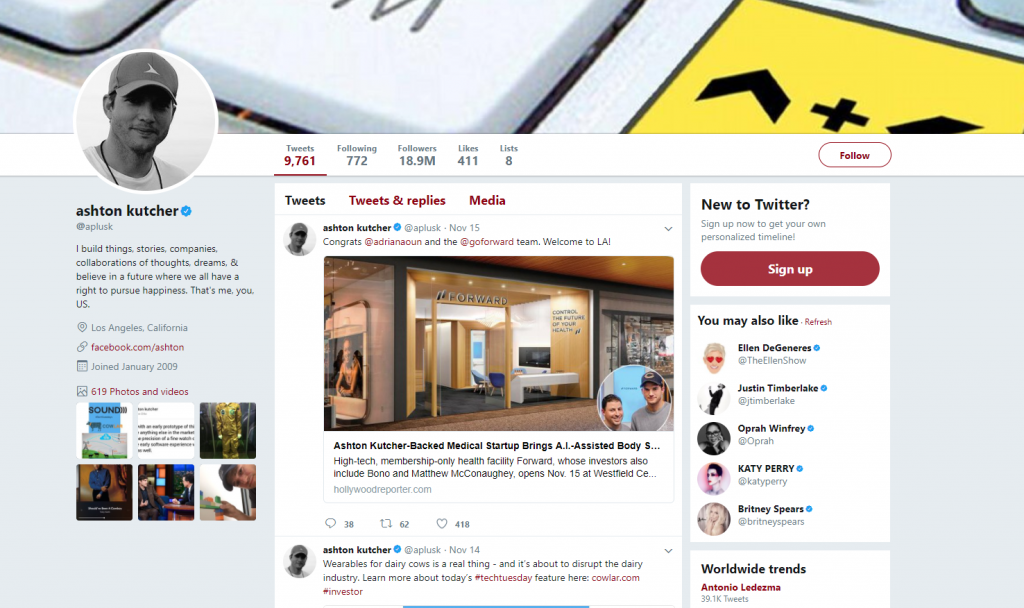
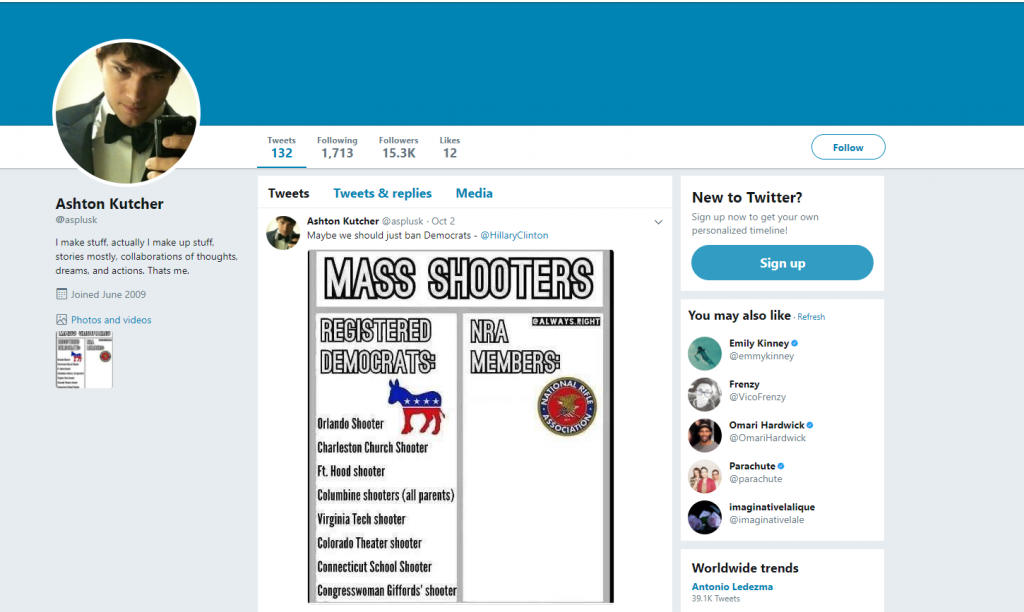
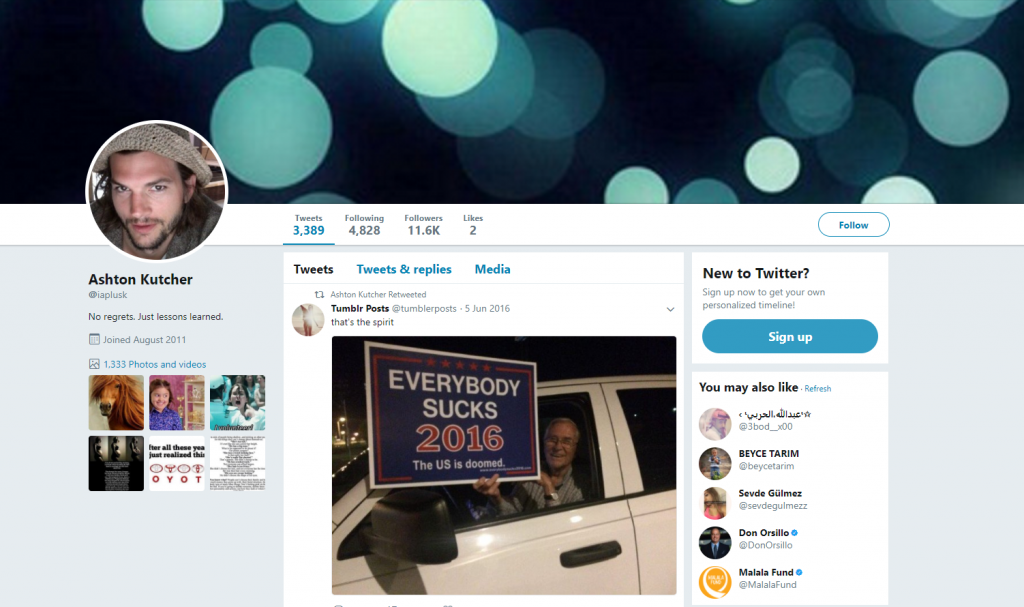
While many celebrities deal with impersonations, brands and restaurants should also concern themselves with verifying their accounts. As you can see below using the example of Ashton Kutcher, the checkmark next to his profile indicates which is the true, authentic account for the actor and entrepreneur.

Real:

Fake #1

Fake #2

Depending on the size of your company, you may elect to go for a verified account whenever and wherever possible. Facebook and Twitter have various instructions for accomplishing this, mostly they involve submitting a valid form of a government ID to verify your identity. Having the badge next to your name on social media can not only make you feel more secure that your identity is not being compromised, but it will also build trust with your audience.

Multi-factor authentication

Enabling multi-factor authentication is highly recommended not only for business owners but individuals as well. Securing your email accounts, social media profiles, and business profiles with two-factor authentication could potentially save you from hardship in the future if someone attempts to hack into your account.

Two-factor authentication works by requiring verification on two devices. Usually, this is through your email address or username, paired with a mobile phone number. This way, if someone manages to discover your username and tries to log into your account, they’ll also need the code from your mobile phone to get access. Multifactor authentication is a step to better protect your brand, and reduce fears of online piracy and identity fraud, and is now employed by a vast majority of the largest social media networking sites.

Monitoring spoofs & impersonations

We recommend regularly Googling your business’ name and keeping track of the search engine page results (SERPs) to identify if other individuals or organizations are impersonating you. Even if the intent isn’t to damage your brand, they present a danger to you by not being under your control. (If you scroll back up, you’ll see how Ashton Kutcher has two Twitter accounts closely resembling his own, unfortunately, the impersonated accounts are used to disseminate jokes of a political nature which may not reflect his own opinion.)

Many popular brands inspire fan pages, parody accounts, and groups, such as Nihilist Arby’s, and Bill Bye Tho. Many official fan pages will have verified accounts too, to encourage followers to select them rather than another account. It is a good practice to be aware of these groups online and if beneficial for your brand, engage with them.

Train your employees on spotting and reporting abuse

Depending on the technical savviness of your staff, you may have employees who are active on social media. Encourage them to follow your business’ social media pages, and instruct them on how to report abuse if they discover it. We recommend that administration of social media accounts is limited to one or two senior members of your marketing or sales team, to maintain consistency in brand tone and messaging.

Use multiple passwords

While this may seem like a pain, at a time where people have dozens of passwords, never re-use the same password twice as a rule of thumb. You may consider using a password manager to keep your credentials organized and safely stored in a convenient manner. As a best practice, attempt to limit sharing passwords within your organization, and elect to create separate usernames and accounts for other people who have administrative access to your social media accounts.

What to do if your social media accounts have been hijacked.

If you are reading this blog because you have been the victim of an account hijacking, remain calm. Everyone and anyone can be the target of a hack, so don’t think that you’re the only company or person to go through this. There are a few remedies you can take immediately if you discover that your account has been hijacked.

If you’re still able to log in, do so and immediately change your password. While you are in there, check that the email address listed on the account is yours, and hasn’t been updated by the hacker. If the email address has been changed, change it back to the email address you previously used. This is of paramount importance because if you leave the hacker’s email address on the account, they could simply request a new password, and the notification would go to that account.

Next, enable two-factor authentication and select the medium you would prefer. If this wasn’t set up in the first place, you may be feeling sheepish and regretting your mistake, but this is an opportunity to learn the importance of safeguarding your accounts.

If you use any third-party applications that are connected to your social media, revoke the access, especially if there are apps you don’t use or recognize. If you use a marketing automation tool such as HootSuite, you can re-add the accounts to the platform later.

If there are any offending messages on your pages, delete them, and issue a public apology.

If your situation is direr and you are no longer able to log in, still, remain calm. On Twitter, you can reset a password request if the hacker did not change the email address associated with the account. Let’s say your hacker did change the email – then you’ll have to go to Twitter’s help center and report the violation on this form. Twitter will contact you and go through the necessary steps to confirm your ownership of the account in question. Once they’ve re-instated your access, go through the above steps after logging in.

Other social media networks have similar instructions for reporting impersonation or hacked accounts. Here is a quick list here for easy access.

Reporting a hijacked account on Facebook: https://www.facebook.com/help/131719720300233

Reporting a hijacked account on Instagram: https://help.instagram.com/368191326593075

Reporting a hijacked account on Snapchat: https://support.snapchat.com/en-US/a/hacked-howto

Reporting a hacked account on LinkedIn: https://www.linkedin.com/help/linkedin/answer/56363/reporting-a-hacked-account?lang=en

Even if you have successfully reclaimed all of your pages back from your hijackers, don’t be complacent. Practice vigilance and continue to monitor your accounts to make sure that hackers do not compromise your restaurant’s social media channels.

If you want more guidance on how to leverage social media marketing for your restaurant or business, contact the team at Absolute Marketing Solutions today for a free digital strategy consultation. We have the experience and knowledge of working with restaurant owners and operators to get their brand story into the minds of their customers. Contact us today at 813 908 6862.

You Might Also Like:

Miné Salkin

Miné Salkin is a multimedia producer with a specialty in marketing, tech writing and digital storytelling.

More Posts

What to do if your restaurant fails a health inspection

failed_health_inspectionIt happens every day. Even to the best and most diligent of restaurant staff and operations teams. It’s the lunch rush at your restaurant, and everyone who works there is working as quickly as they can to get orders in and out to customers. Everything changes from second to second, and your restaurant may be pushed to its limit. Your most hardworking server burned his hand in the kitchen and has to leave for medical care. For the last two hours, it’s been non-stop. One of the cooks has been grilling chicken, and the fridge door’s constantly been open as staff continually reach into it to grab something. At the same time, one of the sinks broke, spilling water all over the kitchen floor.


This chaos would not be complete without a surprise inspection by the state health inspector. If things don’t go well, the health inspector finds some serious violations and promptly shuts you down, advising you not to serve patrons any longer, and hangs a notice on the window until the next reinspection.

There was a time when this situation, as bad as it was, was easily manageable. Your exposure did not extend beyond lost sales for the day and loss of reputation for any customers who happened to discover the situation. Unfortunately, those days are long gone.

Depending on the time of the day, it might be several hours, if not the next day, until the failed report is published on a government website. At this point, it is distributed by some websites and blogs that automatically collect information about restaurant closings. To make matters worse, local media often produce segments aimed at sharing these stories and use the most sensational tactics when doing so.

Media may publicly or secretly film your location. They may stop and interview your customers, filming their reaction to the inspection report. They may confront you or your staff attempting to provoke an angry response. Remember that broken sink? It’s now “sewage found near a food prep area.” That refrigerator that was constantly being opened? It’s now “products stored at dangerous temperatures.”

So, what is the best recourse to avoid tarnishing your restaurant’s name forever by a failed inspection report? How long until the news stations come out to sensationalize your story?

Whether or not you’ve been unlucky enough to be featured on a series such as Dirty Dining, there are steps you can take to mitigate the damages of a failed health inspection. You may have time to get ahead of the story, and you may have time to put other safeguards in place to protect your brand’s reputation.

Depending on the severity of the violations in your report, you’ll need to put together a crisis management plan to ensure that everyone is on the same page and understands how to deal with the media.

Remember, even if you have a crisis at hand, you have a chance to recover. What you say and do following a PR crisis can break you forever, or offer up a chance of redemption. For example, Jack in the Box, a fast-food franchise that carries the title of one of history’s worst cases of widespread foodborne illness, has since become a leader in fast food sanitation, procedures, and safe training. It spent billions on restructuring the way its business was run, to become known as a leader in community leadership and corporate responsibility.

Partnering with an agency that can help you create and execute a crisis management strategy can be an essential tool to get out of the turmoil your organization is experiencing. At Absolute Marketing Solutions, we have helped handle clients resume business and rebuild their reputation after being featured on segments such as Dirty Dining, and other news reports of failed health inspections.

Eric Seidel is a Tampa consumer lawyer at the law firm of McIntyre Thanasides and formerly worked as a journalist on Fox 13 covering consumer affairs, targeting scams, frauds, and consumer rip-offs.

Both as a former member of the media, and an attorney concerned with protecting the rights of consumers and business owners, Eric understands both sides of the media storm that may arise from a failed health inspection at a popular food establishment. Here are some insights from him.

Reputation Management for Restaurants: Failed Health Inspections from Absolute Marketing Solutions on Vimeo.

If you’re in a situation where you have failed a health inspection, and your restaurant is going to be on the news, contact the team at Absolute Marketing Solutions today to get started on your crisis management strategy today. We work with our clients to rebuild their brand and mitigate damage in the midst of a PR crisis.

(On a side note, here are some truly tragic failed health inspection experiences that likely will make you feel better about yourself, via Reddit.)

Health Inspectors of Reddit, what’s the worst violation you’ve ever seen? from AskReddit

You Might Also Like:

Miné Salkin

Miné Salkin is a multimedia producer with a specialty in marketing, tech writing and digital storytelling.

More Posts

Building a new website, or redoing yours? Here’s the web design industry jargon you should know

benefits_of_building_with_PHPIf you’re considering updating your company’s website or starting a new one from scratch, you’ll likely want to be in on the conversations with your web development team as your site, and online identity takes shape. Unfortunately, developers aren’t always the easiest people to communicate with as they tend to casually throw out development lingo they might expect everyone to know. Here’s Absolute’s quick and easy cheat sheet for understanding basic web development vocabulary.

FTP

FTP stands for File Transfer Protocol, and in computing terms, its name signifies the standard for transferring files between a client and a server over the Internet. If you’re building a website, it’s fundamental tool, because it serves as access to a directory or a sub-directory of all your files. Let’s say you’re going to use WordPress as your CMS (explained in a minute) and develop a website over a web server; then you will likely use FTP to move your files over. FTP is one of the OG’s of the web development world and has been around since 1971.

CMS

CMS stands for Content Management system, and it is a computer application that supports creation and editing of digital content, typically, a website. Many have touted it as the most powerful web development tool since the invention of PHP (which we feature in another blog by one of our stellar senior developers!). CMS’s use a database to create, edit, and house HTML content in a way that can be managed by a user or group of users.

Content Management Systems are simple and easy to use, but when choosing one, always make sure that it will support the features and functionalities you need for your website. Some of the more popular CMS’ include WordPress (our pick), Joomla, and Drupal, but there are dozens of others. When selecting a CMS, consult not only with an IT professional, but a creative agency that also is versed and understands best practices for that particular CMS.

HTTP vs HTTPS:

HTTP stands for Hypertext Transfer Protocol, and it is a protocol that is used to transfer information between a web browser, and a website you are using. If the website were to be intercepted, the person making the interception would be able to see the information you’re viewing on a website and sending on a website.

A site that has HTTPS is further secured by a Secure Sockets Layer (SSL) certificate.

SSL

SSL stands for Secure Sockets Layer and is a separate security protocol that can be added to your website to increase security. It’s recommended to purchase these security certificates if your website requests sensitive information such as credit card information, or locations.

SMTP

Simple Mail Transfer Protocol is an Internet standard for e-mail transmission. Dating back to 1982, it is a function that opens communication between two mail servers.

CSS

CSS stands for Cascading Style Sheets, which is a coding language that gives developers the ability to customize the appearance of web pages. Modifying CSS files can allow you to edit fonts, web page layout, colors, and more.

HTML

Hypertext Markup Language, aka HTML, is a coding language that describes the structure of a web page and can give web developers the ability to publish documents with headings, tables, lists, photos, hyperlink content, and multimedia content such as videos and clip clips. It can also be used to design forms that perform specific functions, such as make reservations, order, and purchase products online.

SSH

SSH stands for Secure Shell and is a protocol that provides a secure channel on an unsecured network. Its most popularly known application is for remote logins to computer systems or applications by users. The encryption that is used by SSH is intended to provide confidentiality of your data over an unsecured network like the Internet.

CDN

CDN stands for Content Delivery Network and is a system that stores a cached version of its content in multiple locations, to minimize the distance between you and your content. Why would this be beneficial? Because it increases the speed of the delivery of your content. Today, more than 50% of traffic is being served by CDNs, because every second matters when you are trying to convert a customer on your website.

Hosting

A web hosting service provider is a company or business that provides the technology for a website or webpage to be viewed on the Internet. It does this by storing your website’s information on a special computer called a server. On some occasions, if a site isn’t available or accessible online, it requires contacting the web hosting company to see if something is malfunctioning on the server.

If you have a partner that performs website maintenance services for your business (wink wink), they can handle these types of situations that could easily cost your business if undetected and untreated.

Domain Registrar

According to Wikipedia, a domain name registrar is “an organization or commercial entity that manages the reservation of internet domain names. A domain name registrar must be accredited by a generic top-level domain (gTLD) registry and/or a country code top-level domain (ccTLD) registry.”

There are many domain name registrars to choose from. Some of the more popular ones you may have heard are GoDaddy, Network Solutions, and Name.com.

Building a new website is an exciting time for your business. If you don’t understand all the language your developer uses, don’t be afraid to ask what those terms mean. Do you have any other web development jargon that we haven’t covered here? Contact us to learn more!

You Might Also Like:

Miné Salkin

Miné Salkin is a multimedia producer with a specialty in marketing, tech writing and digital storytelling.

More Posts

5 Must-Have Features for your Restaurant’s Website

restaurant_website_designRestaurants pride themselves on providing a warm environment for visitors to enjoy time with their friends and family while creating meaningful memories over a good meal. While so much time and energy may be devoted to ensuring that your restaurant is pleasant and inviting and your food is of the highest quality, many businesses spend little time or effort ensuring that their  restaurant website design has the same effect. Many websites are launched and then neglected, not kept up-to-date, contain superfluous content, and do not engage a visitor. In short, they are uninviting and likely provide a terrible user experience. 

If you are a restaurant owner or operate one, you may not realize that your outdated website is hurting your business. Here are Absolute’s 5 Must-Haves for your restaurant website to maximize leads, build customer loyalty, and elevate your brand. 

Make it easy for them to contact you 

Nothing is more important than making sure your site’s visitors know how to reach you. Prominently list your name, address, and phone number (NAP) on your homepage, footer, and contact pages. As a rule of thumb, offer as many points of contact as possible so that if they search for you, they know exactly how to make a reservation, order online, or ask a question.  

If you have a customer looking for your restaurant, don’t frustrate them with poor information layout so that they go somewhere else! If you have a newsletter, you can also offer an opt-in for your customers where they can sign up and collect information on future promotions. In short, make it easy for your customers to get what they’re looking for. 

Show off your Menu 

Ideally, your menu should be displayed in HTML format so that search engines can index your content, and users can easily read your page on various devices. However, if you are updating your menu often, it can be time-consuming to make the changes. Therefore, we see that many restaurants opt for a PDF version of their menu for the sake of simplicity. 

We recommend having both. PDF’s can make the page load more slowly and may be difficult to view on smaller screens. We suggest including your menu as a PDF in case a user wants to download and print your menu for future reference. Always make sure your menu is updated to reflect price changes, the addition or removal of menu items, or any other modifications. 

Make Your Website Responsive 

Always consider that a significant portion of your audience may be looking for you, or viewing your website, from a mobile or tablet device. In 2015, mobile search exceeded desktop search, so if your website isn’t responsive, it will likely give a poor user experience. Not only can it negatively impact the user’s opinion of your business, but can result in penalization from Google, which gives preferences to mobile-friendly, responsive websites in search results. A study recently found that 60% of consumers will go to a competitor’s site after a bad mobile experience, so don’t give your potential customers a reason to visit your competitor. 

Appealing Visuals  

While videos can be a powerful promotional tool for your brand, having a slow loading video start up on autoplay isn’t a best practice. The same goes for background music. Nothing is more annoying than a slow page loading, followed by background music that you can’t turn off or control. 

The aesthetics of websites have changed over the years, and while splash pages once created an allure of exclusivity, they won’t provide your user with any other benefit than having to click once more to enter your site.  

Instead, use appealing visuals including photographs of your food, restaurant interior, seating arrangements, and visitors to entice future customers into your establishment. Your homepage is the prime opportunity to showcase the ambiance and atmosphere of your restaurant and give the user an impression of your eatery in a few fleeting moments. 

Be sure to highlight special offerings, favorite menu items, chef specials, and other pictures to represent your establishment and add tremendous visual flair to your website. 

Social Media, Reviews, and Testimonials 

Nothing adds more credibility to your restaurant’s website than reviews from real people who have visited your establishment. Indicate your social media channels so that users can follow you, or read more about other people’s experiences. According to Brightlocal, nearly 90% of visitors trust online reviews as much as personal recommendations. While there are so many channels, you may wish to choose the ones that work best for your brand. Social media can increase customer retention and advocacy, so don’t neglect to monitor those online properties and ensure that they are consistent with your website and restaurant.  

Absolute Marketing Solutions is an award-winning web design company based in Tampa, Florida. We have served over 200+ clients worldwide providing digital strategies to accelerate growth and create new business opportunities. To learn more about our team, visit our page here.  

Want to get the Bonus Website Must-Have? Sign up below for exclusive access: 

Content 

Search engines, as well as humans, love quality content. With that said, having a place on your restaurant’s website, such as a blog, is an integral part of your overall digital marketing efforts. Be sure to add blog posts, news stories, awards and recognition, and other pieces of relevant information that would benefit your customers. For a free content marketing evaluation, contact the team at Absolute Marketing Solutions today. 

You Might Also Like:

Miné Salkin

Miné Salkin is a multimedia producer with a specialty in marketing, tech writing and digital storytelling.

More Posts